
Introduction
If your Windows 11 taskbar is not working, you may notice that the Start menu, icons, or system tray are unresponsive. This issue is often caused by Windows Explorer crashes, system glitches, or recent updates. The good news is that most taskbar problems can be fixed quickly with a few simple steps. Windows 11 Taskbar Not Working (Fix Guide)
Quick Checks Before Advanced Fixes
Before moving to more advanced troubleshooting, try these quick checks:
• Restart your computer
• Try pressing the Windows key
• Check if the taskbar is frozen or completely unresponsive
• Make sure Windows is fully updated
Sometimes these simple steps resolve the problem immediately.
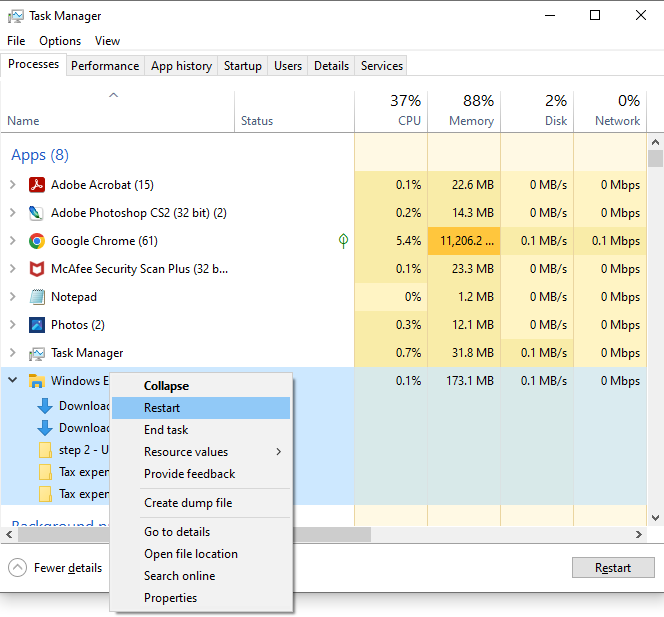
Fix 1: Restart Windows Explorer
The taskbar is controlled by Windows Explorer.
- Press Ctrl + Shift + Esc to open Task Manager
- Scroll down and find Windows Explorer
- Right-click it
- Click Restart
This often restores the taskbar instantly.
Fix 2: Run System File Checker
Corrupted system files can cause taskbar issues.
- Press Windows + S
- Type cmd
- Right-click Command Prompt → Run as administrator
- Type:
sfc /scannow
Press Enter and wait for the scan to complete
Fix 3: Re-register the Taskbar
This resets taskbar components.
- Right-click Start → open Windows Terminal (Admin)
- Paste:
Get-AppxPackage Microsoft.Windows.ShellExperienceHost | Foreach {Add-AppxPackage -DisableDevelopmentMode -Register "$($_.InstallLocation)\AppXManifest.xml"}
3. Press Enter
When to Contact IT Support
If the taskbar still does not respond after restarting Explorer and running system scans, the issue may be related to system corruption or group policy settings in a work environment.
Final Thoughts
If your Windows 11 taskbar is not working, restarting Windows Explorer, repairing system files, or re-registering taskbar components will usually resolve the issue quickly.
Frequently Asked Questions
Why is my Windows 11 taskbar not working?
Taskbar issues are usually caused by Windows Explorer crashes, corrupted system files, or recent Windows updates.
Does restarting Explorer fix the taskbar?
Yes. Restarting Windows Explorer is one of the fastest ways to restore a frozen or unresponsive taskbar.
Can updates break the taskbar?
Yes. Some Windows updates can temporarily affect taskbar functionality, but the issue can usually be fixed with troubleshooting steps.
Related Issue: